Blogger Widgets

Πέμπτη 4 Οκτωβρίου 2012

X10 mini Bootloader Unlock

1) Turn the phone on....go to Settings - Applications - Development - USB Debugging On.
2) Connect it on PC
3 if xxxx is "NOT RECOGNIZED" then , it can't be unlocked...but if xxxx is SEMC then run "msm 7227_semc.cmd"
4)if "xxxx SIMLOCK CERTIFICATE" was not found then run "msm7227_Setool2.cmd"


Then Run S1Tool to be sure that your X10 mini is Successfully Unlocked
If you see something like this
11/4/2011 1:48:33 PM LOADER VERSION: "r8A029"
Congratulations!!! Your X10 mini has Unlocked Bootloaders
BUT...
If you see something like this
11/4/2011 1:48:33 PM LOADER VERSION: "R8A029"
Then you have to do all of this again because maybe something went wrong..
So if you noticed the difference between this one:
11/4/2011 1:48:33 PM LOADER VERSION: "r8A029" and this one:
11/4/2011 1:48:33 PM LOADER VERSION: "R8A029" is the 
First letter of loader version....The lowercase "r" means Bootloader Unlocked...The uppercase "R" means bootloader NOT Unlocked...

Download Links:
msm7227:
http://www.mediafire.com/?fmtaykoi9w2bm5x

S1Tool:
http://www.mediafire.com/?w6atur2m806ujqk

FlashTool 0.9.1.0:
http://www.mediafire.com/?j2exa1cc6y2jp6i

Πέμπτη 20 Σεπτεμβρίου 2012

Xperia Neo V BootLoader Unlocking

"Follow this guide on your risk , it may harm your device and your warranty may be void. I'm not responsible for any damage"

Go to the phone dialer
Tap*#*#7378423#*#* then a service menu should pop up,
Tap Service info > Configuration > Rooting Status. if it says boot loader unlock allowed then you are good to go.
If it says not allowed or no or unknown then you will need to pay to have the boot loader unlocked. Or by Sony Ericsson Bootloader unlocker...But you lose some DRM Security Keys which can cause FOTA brick. it will also damage some Sony Ericsson apps like Track ID...
If you want to do it use this site: http://unlockbootloader.sonymobile.com/
But in this guide i use S1Tool...you don't lose DRM Security Keys...
Find your phone's Test Points ex. MT11i Sony Ericsson Experia Neo V


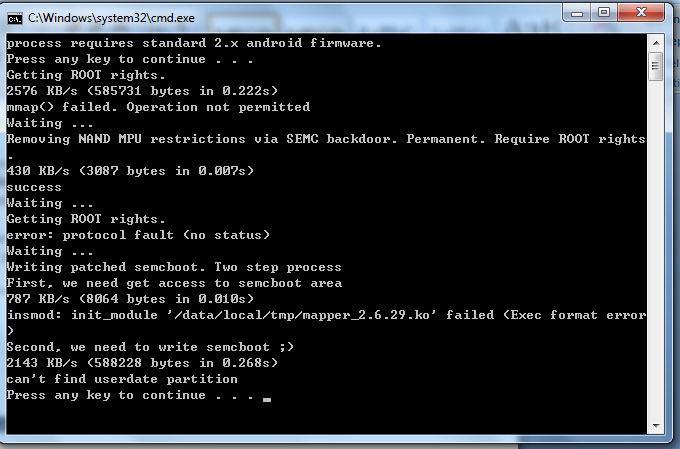
Now install drivers and then open S1Tool choose Patch SEMCBoot and remove your phone's battery and connect the one of the two testpoints with the battery negative with a small wire...Like this:


It's easy to do it (in my opinion)....


Then you should see something like this:


11/8/2011 1:48:53 AM Welcome to S1 tool. 
11/8/2011 1:48:53 AM That is small and crippled subset of SETOOL2 service tool. 
11/8/2011 1:49:19 AM 
11/8/2011 1:49:19 AM DETACH USB CABLE FROM PHONE 
11/8/2011 1:49:19 AM REMOVE BATTERY FROM PHONE 
11/8/2011 1:49:19 AM ATTACH TESTPOINT 
11/8/2011 1:49:19 AM PRESS "READY", THEN ATTACH USB CABLE TO PHONE 
11/8/2011 1:49:19 AM 
11/8/2011 1:51:58 AM PROCESSING ... 
11/8/2011 1:51:59 AM REMOVE TESTPOINT NOW, THEN PRESS "READY" 
11/8/2011 1:51:59 AM 
11/8/2011 1:52:30 AM 
11/8/2011 1:52:31 AM TO CONNECT NEXT PHONES 
11/8/2011 1:52:31 AM X10 Xperia,E10 Mini,E15 Xperia X8,U20 Mini Pro 
11/8/2011 1:52:31 AM LT15 Xperia ARC,MT15 Xperia NEO,R800 Xperia PLAY 
11/8/2011 1:52:31 AM PRESS AND HOLD "BACK" BUTTON... 
11/8/2011 1:52:31 AM 
11/8/2011 1:52:31 AM ST18 Xperia RAY,ST15 Xperia Mini,SK17 Xperia Mini Pro 
11/8/2011 1:52:31 AM PRESS AND HOLD "Volume Down" BUTTON... 
11/8/2011 1:52:31 AM 
11/8/2011 1:52:31 AM PLEASE ATTACH TURNED OFF PHONE NOW 
11/8/2011 1:52:31 AM 
11/8/2011 1:52:35 AM 
11/8/2011 1:52:35 AM RUNNING S1_LOADER VER "R4A062" 
11/8/2011 1:52:35 AM LOADER AID: 0001 
11/8/2011 1:52:36 AM FLASH ID: "00EC/00B3"
11/8/2011 1:52:36 AM LOADER VERSION: "r4A069"

11/8/2011 1:52:36 AM 
11/8/2011 1:52:37 AM SEMC SIMLOCK CERTIFICATE, PROCEEDING 
11/8/2011 1:52:37 AM FINISHED 11/8/2011 1:52:37 AM Elapsed:135 secs.


The only thing that we want to see after the process is:
11/8/2011 1:52:36 AM LOADER VERSION: "r4A069"
the small "r" means that your bootloader is SUCCESSFULLY UNLOCKED... 
But if you go again to the phone dialer and

Tap*#*#7378423#*#* then a service menu should pop up,
Tap Service info > Configuration > Rooting Status.You should see this:


But your bootloader is UNLOCKED 100% !


Now you are free to install kernels and roms into your phone with fastboot...:)
(In my opinion the best way to install kernels and roms are with Flashtool...)

Download Links:
S1Tool:
http://www.mediafire.com/?w6atur2m806ujqk

FlashTool 0.9.1.0:
http://www.mediafire.com/?j2exa1cc6y2jp6i
Πέμπτη 6 Σεπτεμβρίου 2012

Minimum Version Check

1st Go to System Update
2nd Update Via Storage Media
3rd Continue until system update and it will fail to install and display the minimum firmware that your PS3 can be downgraded...

Download Link:
http://www.mediafire.com/download.php?8icqrtw6ucfd0s5

How To Use Elite Mossy Patch Blocker


Wireless

Network Settings -> OK -> Custom -> Wireless -> Enter Manually -> Username -> Password -> Automatic -> Do Not Set -> Automatic -> Automatic -> Use -> Address = 192.168.1.82     Port Number = 8080 -> Enable -> X

Wired


Network Settings -> OK -> Custom -> Wired Connection -> Auto-detect -> Automatic -> Automatic   -> Automatic -> Use -> Address = 192.168.1.82     Port Number = 8080 -> Enable -> X


I used image's Address and Port Number...In your case should be different...


Download Link:
http://www.mediafire.com/download.php?0wbmn1vwjiuebn4


COD Black Ops Zombies V1.0.0 + Game Data

COD Black Ops Zombies V1.0.0 + Game Data


Call of Duty: Black Ops Zombies Now Available on Android

The Call of Duty: Zombies phenomenon has risen back to life.
Adapted from the best-selling console hit and built specifically for tablets and smartphones, Call of Duty: Black Ops Zombies delivers fan-favorite, heart-pounding maps: Kino Der Toten, Ascension, and Call of the Dead: Director’s Cut, as well as “Dead-Ops Arcade,” a 50-level zombie gauntlet that provides the ultimate undead challenge for fans of Call of Duty’s signature zombie warfare.
Play solo or join a team of up to 4 players via Wi-Fi as you mow down hordes of zombies using a variety of weapons and perks only available in the Call of Duty zombie experience.
Players can also opt to enhance their experience and get out of a jam with the in-game CoD Point System. 
With six tiers of in-app purchasing options to choose from, Zombies fans will be able to take their experience to a whole new level by unlocking additional areas and securing better weapons in much less time. Please note that CoD points are only applicable in single player.
Sure, earning Achievements and Point-Multipliers is nice, but to survive these Co-Op Maps, you’ll need friends as much as you’ll need firepower. Lucky for you, not only will the weapons and perks you love from Call of Duty lie at your fingertips, you can join with up to 4 players via Wi-Fi to play mulitiplayer.
As if that wasn’t enough, Call of Duty: Black Ops Zombies also includes “Dead-Ops Arcade” mode, an arcade-style top-down shooter perfectly suited for mobile combat vets. Unlocking the mode is easy—simply find the four missing coins in the game’s menus.
And don’t forget to download the Call of Duty: ELITE Mobile App for an inside-edge on your console Call of Duty Multiplayer experience. Head over to the Google Play Store for all the grisly details on both Apps.

• Buy CoD points in the Main Menu to use when you run out of earned points in-game.
• CoD points can be spent on anything in the game such as reviving, opening doors, weapons, perks, and the mystery box but are only used when you do not have enough earned points.
• Revives can also be bought with CoD points if you die without the revive perk, although the three revive limit still applies.
• Note: Your CoD points will be lost if the app is uninstalled from your device.


Download Link:
http://www.mediafire.com/download.php?4ks6e6xrvvtba03

Android Games


Game Keyboard

http://www.mediafire.com/?k52e2wga8x2rnpw

Live Wallpaper Logcat

http://www.mediafire.com/?pa7g31pv07av5z7

Bulldog (game hacking)

http://www.mediafire.com/?2iyi5sysvi38wxc

Playstation

http://www.mediafire.com/?kwn1z2v4scod61u

Xperia Play Modded Camera

http://www.mediafire.com/?mcsi21k1ma50fiy

GameCIH

http://www.mediafire.com/?ndr8wab44awqmxz

Worms

http://www.mediafire.com/?u1pfikubx96ny7e

Contract Killer v1.0.2

http://www.mediafire.com/?13ttu41ul84ew6n

Air Control

http://www.mediafire.com/?23qnf4bf1m6p1j7

Applanet

http://www.mediafire.com/?r6ggbrj53jyqhfy

Aquarium Live Wallpaper

http://www.mediafire.com/?0cjt8s9y3f99rqr

Asphalt 7

http://www.mediafire.com/?3a79j96s5l535ij

CHAOS

http://www.mediafire.com/?dvvbfn5oa1567b2

Clouds n Sheep Premium

http://www.mediafire.com/?j8xta48h34c1vfh

Cogs

http://www.mediafire.com/?178uhno56ja84gd

CoPilot Premium Europe

http://www.mediafire.com/?151yn31c474ymjz

Death Worm

http://www.mediafire.com/?r87wp8t857cxmqr

F1 2012 Timing App Premium

http://www.mediafire.com/?py2ox2dcnam4qa0

Fruit Ninja(Hacked)

http://www.mediafire.com/?3yjes2qc3c0c555

Go Launcher EX 2.76

http://www.mediafire.com/?n4lmfjmyl8fttdt

Guerilla Bob

http://www.mediafire.com/?11w0ojb6kc1aq38

Navigon Europe 4.1.1

http://www.mediafire.com/?qm0uu5df5xd3fae

OSMOS HD

http://www.mediafire.com/?szr4bl8q2upgpxg

PSStore

http://www.mediafire.com/?tn7xbp2cvsqydqx

Rise Of Glory

http://www.mediafire.com/?5spopxgk8x2j2w2


Robo Defense(Paid) 

http://www.mediafire.com/?nbkryqv849gbjp2

Root Tools

http://www.mediafire.com/?6westyfx5c6g8j6

Tapatalk

http://www.mediafire.com/?dj66jn462dddwqj

UNO 3.6.6

http://www.mediafire.com/?aye34ydhi8dp8y5

Roll a Joint

http://www.mediafire.com/?5663fmoflf5x16o

Where's My Water(Fully Unlocked)

http://www.mediafire.com/?fhg9uggtdfs6swi

PowerAMP 2.0.467 Full

http://www.mediafire.com/?xbxom4iip0zck81

Πέμπτη 30 Αυγούστου 2012

PS3 Demonstration Mode

1st Rename "4.21 Beta (Demonstration Mode).PUP to UPDAT.PUP"
2nd Create a folder in your USB with the name PS3 then create another one inside PS3 folder with the name UPDATE and paste UPDAT.PUP in it...
3rd Turn on your PS3 and go to System Update -> System Update via Internet and wait...
4th When your PS3 will finish you will see on the right corner 4.21 Demonstration Mode the only thing you can do is to play a game...
5th Now go to Security Settings and HOLD R1+L1+SELECT+SQUARE and you will see that it wants four digits...In my case is 0000 and 70% the same for you too...
NOW YOU HAVE PACKAGE INSTALL AFTER INTERNET SETTINGS....BUT IT WON'T DO EXACTLY NOTHING EVEN IF YOU FIND PKG FILES...IT GIVES YOU AN ERROR THAT IT HASN'T SIGNED....SOOOOOO IT'S A SONY'S BULLSHIT!!!!....BUT IF YOU WANT...GIVE IT A TRY...IS NICE EXPERIENCE...:)
LINKS :
4.21 Demonstration Mode File: http://www.mediafire.com/download.php?m999g61disan41d
Reverter: http://www.mediafire.com/download.php?0sfn1axapozoa6z


Also if you want to remove Demonstration Mode delete 4.21 Beta (Demonstration Mode).PUP file and paste go to recovery(Put your finger in ON button and HOLD it till you here one beep and after it you will hear another one in 2-3 seconds and it will shut itself off...Remove your finger and again put your finger in  in ON button and HOLD it till you here two beeps then plug your controller and go to System Update and it


1st Rename "Reverter.PUP to UPDAT.PUP"
2nd Paste Reverter.PUP in UPDATE folder...
3rd Turn on your PS3 and go to recovery (Put your finger in ON button and HOLD it till you here one beep and after it you will hear another one in 2-3 seconds and it will shut itself off...Remove your finger and again put your finger in  in ON button and HOLD it till you here two beeps then plug your controller) and go to System Update and it will install the Normal 4.21...
IP widget
Έχετε συνδεθεί στην σελίδα πριν:

Δευτερόλ.
GRDriftKing